 Skip to content
Our Samsung Repair Process
GadgetFix is a place where you can get all Samsung repairs, screen replacement, battery replacement, charging port repair, camera fixes, and full internal diagnostics performed to detect hidden issues. We have been doing repair services for many years, and our highly trained technicians are well-equipped with various Samsung models.
Our Samsung Technical Work

Screen & Battery

Buttons & Moving Parts


Motherboard Repair
Samsung Faults We Fix
Samsung Screen Repair
A broken or damaged Samsung screen usually results from drops or pressure. AMOLED damage can affect touch response, display clarity, and color accuracy. The repair process involves removing the damaged display and installing a new calibrated screen. After installation, we test touch response and display performance carefully to ensure proper function.
After the replacement screen is checked for brightness, color balance, and touch accuracy before final seal to ensure your device performs smoothly after Samsung screen repair services.
Samsung Battery Repair
If you’ve experienced a downgraded performance of the phone’s battery, or if the battery is swollen. We replace the old battery with a tested, brand-new component to restore normal backup and stability of your device.
After a Samsung battery replacement, our team of professionals carefully check charging speed, temperature control, and overall performance under load to ensure reliability.
Samsung Charging Port Repair
Most charging port problems are due to dust, regular wear and tear by your charger or external damage. In cases where cleaning is unsuccessful we will replace the complete USB-C charging assembly in order to achieve reliable stable charging and data transfer.
Following the installation of the Samsung charging port, our technicians tested several cables to ensure good speed and a solid connection.
Samsung Water Damage Repair
Water exposure can cause corrosion and short circuits on internal components. We carefully clean the motherboard using professional methods and inspect damaged parts under magnification.
If required, faulty components are replaced, and we make sure your Samsung phone is fully tested for stability before return. Visit our store today for affordable solutions.
Samsung Not Turning On Repair
A non-working Samsung device may be caused by battery failure, software crash, or motherboard damage. Our professionals carefully diagnose the issue using testing tools to find the exact fault.
Our Samsung not turning on repairs may include battery replacement, board repair, or system recovery. After repair, we perform multiple power tests to ensure stable performance.
Samsung Back Glass Repair
A cracked back glass affects both appearance and safety. It can also reduce water resistance. We safely remove the broken glass and install a new back panel without damaging internal parts or wireless charging components.
At GadgetFix, after replacement, our highly trained team will ensure proper fitting and finish quality.
How Quickly We Fix Samsung Devices
Samsung screen and battery repairs are usually completed within the same day depending on parts availability. Simple repairs take a few hours, while complex issues may take longer.
Mail-in repairs depend on shipping time and diagnostic requirements. Our Samsung phone repair professionals always aim to provide you with fast turnaround without compromising quality.
Estimated Samsung Repair Time
How Much Does Samsung Repair Cost?
Samsung repair price depends on the model of the phone and the type of damage. Screen repairs like AMOLED displays usually cost more, while issues like battery or charging port repair are cheaper.
The total cost also changes based on how serious the damage is. If more parts are affected, the repair can become more expensive.
Before any repair, a check is done to tell the exact cost. This way, customers know the price in advance and there are no extra or hidden charges.
Repair Costs for Samsung Models
| Model Class | Screen Repair | Battery Repair | Charging Port Repair |
|---|---|---|---|
| Galaxy A Series | $79 – $149 | $39 – $69 | $49 – $89 |
| Galaxy S Series | $129 – $299 | $59 – $99 | $79 – $129 |
| Galaxy Note Series | $149 – $329 | $69 – $109 | $89 – $139 |
| Galaxy Z Series | $249 – $499 | $99 – $149 | $129 – $199 |
Note: Pricing varies depending on model and parts quality.
How Samsung Repair Works
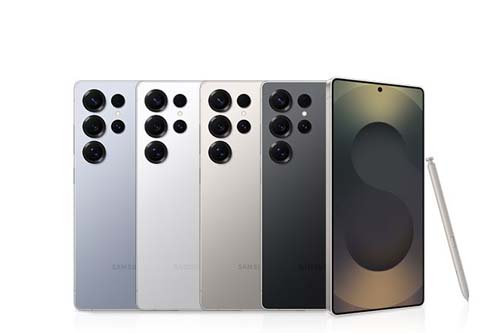
GadgetFix provides top-notch Samsung phone repair services. Our skilled technicians can assist you in addressing several problems with your phone, including screen repair, battery replacement, water damage repair, charging port repair and back glass restoration. Below is a breakdown of how we finish off your repair.
- Diagnose the issue: Identify the exact problem using testing tools.
- Check hardware/software: Inspect internal parts and system performance.
- Open device carefully: Disassemble the device without causing damage.
- Replace faulty parts: Swap damaged components with new ones.
- Reassemble properly: Put the device back together with proper sealing.
- Test device again: Run final checks to ensure everything works correctly.
Can You Repair a Samsung on Your Own?
Basic Fixes You Can Do Yourself
You can try simple troubleshooting steps at home such as restarting your device or updating the software. These basic fixes often solve minor issues and improve overall performance without any risk.
Restart/update
Restart fixes small software bugs and improves speed. Updates also improve performance and stability.
Clean charging port
Dust can block charging. Gentle cleaning can fix connection issues safely.
Time to Get Professional Help
Some problems require expert repair services, especially when hardware is involved. Attempting repairs on complex components can make the issue worse.
Screen/battery repair
Screen and battery issues in Samsung Electronics need special tools. DIY repair can damage the device.
Motherboard issues
Internal hardware problems are complex. Professionals are needed to avoid permanent damage.
Repair vs Replace
Repair vs replace is a common decision when something is damaged, worn out, or not working properly. Repair usually means fixing the existing item to restore its function at a lower cost, while replacement means getting a new one when repair is no longer practical, safe, or cost-effective. The right choice depends on cost, lifespan, performance, and safety.
Cost of Repair vs Replacement
Repair is often cheaper upfront because it only addresses the faulty part, but repeated repairs can add up over time. Replacement costs more initially but can save money long-term if the old item keeps breaking down.
Condition and Age of the Device
If the item is relatively new or in good overall condition, repair is usually the better option. If it is old, heavily worn, or outdated, replacement is often more practical.
Performance and Efficiency
A repaired item may still work but not as efficiently as before. A replacement usually offers better performance, improved features, and higher energy efficiency.
Our Repair Warranty
We provide warranty coverage on all Samsung repairs to ensure quality and reliability. If any issue occurs with the repaired part due to workmanship or manufacturing defects, we fix it free of cost.
Our aim is to provide dependable repairs that keep your device working properly for a long time. Please note that the warranty does not cover physical damage, liquid damage after repair, or third-party tampering.
Coverage:
This includes manufacturing defects and installation-related issues during normal use.
Exclusions:
This does not cover physical damage after repair, water damage after service, or third-party tampering.
FAQs
Yes, we provide a 90-day warranty on most Samsung repairs. It covers part defects and installation issues. If a problem occurs, we fix it for free under warranty. Warranty does not include physical or water damage.
Samsung repair time depends on the issue and parts availability. Simple repairs like screen or battery are usually same-day. Complex issues like motherboard repair may take longer.
Yes, we repair all Samsung models including A, S, Note, and Z series. Both old and new devices are serviced by our technicians.
Screen repair cost depends on the model and AMOLED type. Premium displays usually cost more than basic parts. We offer competitive pricing for all Samsung devices. The final price is shared after inspection only.
We use high-quality OEM and compatible parts. All components are tested before installation. We ensure proper performance and durability. Quality is maintained for every repair.
